Sources.
applications/ContactStructuralMechanicsApplication/CMakeLists.txt,pyproject.toml,python_scripts/auxiliary_methods_solvers.py,python_scripts/alm_contact_process.py,python_scripts/search_base_process.py,StructuralMechanicsApplication/python_scripts/python_solvers_wrapper_structural.py; test cases undertests/.
1. Compilation
The application depends on the StructuralMechanicsApplication (hard CMake dependency) and, transitively, on the Kratos core. Add both to the application list of your configure script, after StructuralMechanicsApplication:
add_app ${KRATOS_APP_DIR}/LinearSolversApplication      # optional: AMGCL and direct solvers used as inner solvers
add_app ${KRATOS_APP_DIR}/StructuralMechanicsApplication # required
add_app ${KRATOS_APP_DIR}/ContactStructuralMechanicsApplication
add_app ${KRATOS_APP_DIR}/ConstitutiveLawsApplication    # optional: hyperelastic/plastic laws used by several tests
add_app ${KRATOS_APP_DIR}/MeshingApplication             # optional: adaptive remeshing (needs -DINCLUDE_MMG=ON)
The build produces the shared library KratosContactStructuralMechanicsCore (conditions, processes, utilities, frictional laws, constraints) and the pybind11 module KratosContactStructuralMechanicsApplication. Strategies, convergence criteria, builder-and-solvers and the mixed linear solver are header-only and compiled into the Python module. The generated contact conditions are large (ALM_frictional_mortar_contact_condition.cpp alone has about 170 000 lines), so they are excluded from unity builds; expect the application to take a few minutes to compile. Testing sources are built when KRATOS_BUILD_TESTING=ON, and the test data is installed with INSTALL_TESTING_FILES=ON.
The application is also distributed as the wheel KratosContactStructuralMechanicsApplication (dependencies KratosMultiphysics and KratosStructuralMechanicsApplication of the same version):
pip install KratosMultiphysics-all # or KratosStructuralMechanicsApplication + KratosContactStructuralMechanicsApplication
Importing the module pulls the structural application automatically:
import KratosMultiphysics
import KratosMultiphysics.ContactStructuralMechanicsApplication as CSMA
2. Anatomy of a contact case
A contact simulation is an ordinary structural analysis (StructuralMechanicsAnalysis) with two additions in ProjectParameters.json:
- a
contact_settingsblock insidesolver_settings— its mere presence makes the structural solver wrapper instantiate the contact solver (contact_structural_mechanics_static_solver,contact_structural_mechanics_implicit_dynamic_solverorcontact_structural_mechanics_explicit_dynamic_solver); withmpc_contact_settingsinstead, the MPC solvers are used; - a contact process (
alm_contact_process,penalty_contact_process,explicit_penalty_contact_process,mpc_contact_processormesh_tying_process) in the process lists, which declares the contacting surfaces.
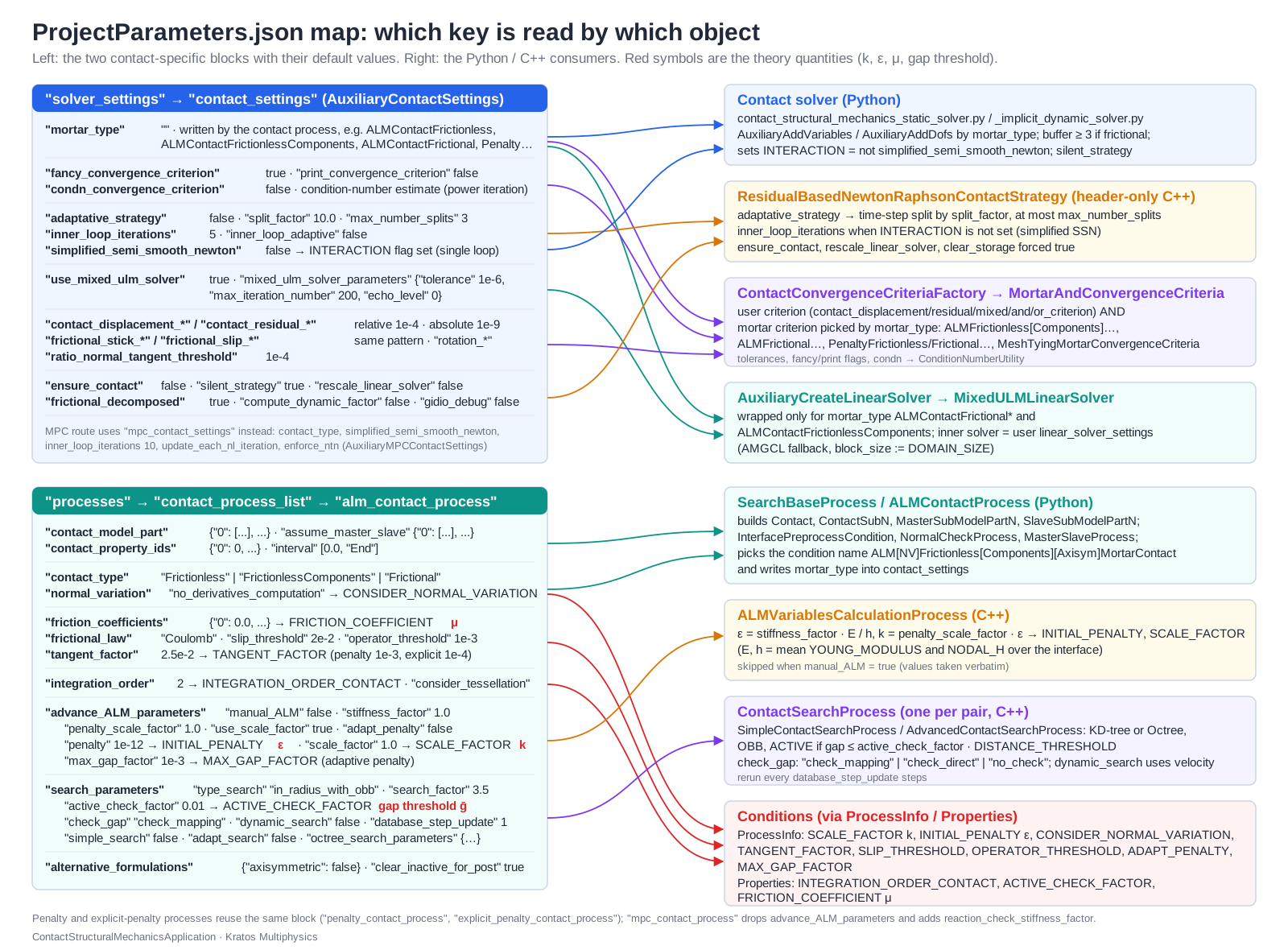
The minimal working example below is the frictionless “hyper simple patch test” shipped with the tests (two blocks pressed together; the file names refer to tests/ALM_frictionless_contact_test_2D/):
{
    "problem_data" : {
        "problem_name" : "hyper_simple_patch_test",
        "parallel_type": "OpenMP",
        "start_time"   : 0.0,
        "end_time"     : 1.0,
        "echo_level"   : 0
    },
    "solver_settings" : {
        "model_part_name"          : "Structure",
        "domain_size"              : 2,
        "solver_type"              : "Static",
        "analysis_type"            : "non_linear",
        "model_import_settings"    : { "input_type" : "mdpa", "input_filename" : "hyper_simple_patch_test" },
        "material_import_settings" : { "materials_filename" : "hyper_simple_patch_test_materials.json" },
        "contact_settings"         : { "mortar_type" : "ALMContactFrictionless" },
        "time_stepping"            : { "time_step" : 1.1 },
        "convergence_criterion"    : "contact_residual_criterion",
        "displacement_relative_tolerance" : 1.0e-4,
        "displacement_absolute_tolerance" : 1.0e-9,
        "residual_relative_tolerance"     : 1.0e-4,
        "residual_absolute_tolerance"     : 1.0e-9,
        "max_iteration"                   : 20
    },
    "processes" : {
        "constraints_process_list" : [{
            "python_module" : "assign_vector_variable_process",
            "kratos_module" : "KratosMultiphysics",
            "Parameters"    : {
                "model_part_name" : "Structure.DISPLACEMENT_Displacement_Auto2",
                "variable_name"   : "DISPLACEMENT",
                "constrained"     : [true, true, true],
                "value"           : [0.0, 0.0, 0.0]
            }
        },{
            "python_module" : "assign_vector_variable_process",
            "kratos_module" : "KratosMultiphysics",
            "Parameters"    : {
                "model_part_name" : "Structure.IMPOSE_DISP_Auto1",
                "variable_name"   : "DISPLACEMENT",
                "constrained"     : [true, true, false],
                "value"           : [0.0, -0.01, 0.0]
            }
        }],
        "contact_process_list" : [{
            "python_module" : "alm_contact_process",
            "kratos_module" : "KratosMultiphysics.ContactStructuralMechanicsApplication",
            "process_name"  : "ALMContactProcess",
            "Parameters"    : {
                "model_part_name"     : "Structure",
                "contact_model_part"  : { "0" : ["Contact_Part_1", "Contact_Part_2"] },
                "assume_master_slave" : { "0" : ["Parts_Parts_Auto2"] },
                "contact_type"        : "Frictionless"
            }
        }]
    },
    "output_processes" : {
        "vtk_output" : [{
            "python_module" : "vtk_output_process",
            "kratos_module" : "KratosMultiphysics",
            "Parameters"    : {
                "model_part_name"                    : "Structure",
                "output_sub_model_parts"             : false,
                "nodal_solution_step_data_variables" : ["DISPLACEMENT", "REACTION", "NORMAL", "LAGRANGE_MULTIPLIER_CONTACT_PRESSURE", "WEIGHTED_GAP"],
                "nodal_data_value_variables"         : ["AUGMENTED_NORMAL_CONTACT_PRESSURE"],
                "nodal_flags"                        : ["ACTIVE", "SLAVE", "MASTER"]
            }
        }]
    }
}
and the driver script is the standard one:
import KratosMultiphysics
from KratosMultiphysics.StructuralMechanicsApplication.structural_mechanics_analysis import StructuralMechanicsAnalysis

with open("ProjectParameters.json") as f:
    parameters = KratosMultiphysics.Parameters(f.read())

model = KratosMultiphysics.Model()
StructuralMechanicsAnalysis(model, parameters).Run()
Run it with python3 MainKratos.py. A complete, executed walk-through of a Hertz contact problem, including the expected console output and the comparison with the analytical solution, is given in the tutorial.
What the process needs from the mesh
contact_model_partlists, for each interface (keys"0"…"9"), the sub-model-parts whose conditions or skin form the potential contact surfaces. If a listed sub-model-part contains only elements, the process detects its skin and creates the interface conditions automatically (InterfacePreprocessCondition). If nothing is listed, the skin of the whole model part is used.assume_master_slavenames the sub-model-parts to be treated as slave (the mortar integration is performed on the slave side; the Lagrange multipliers live on slave nodes). The other side of the pair is the master. Leave it empty to let the application assign the roles automatically (needed for self-contact).- The process creates the sub-model-parts
Contact,ContactSub<k>,MasterSubModelPart<k>,SlaveSubModelPart<k>andComputingContact(the latter holds the pair conditions used for assembly) and sets theINTERFACE,SLAVE/MASTER,ACTIVEandSLIPflags on nodes and conditions. - Normals must point outwards; the process checks and reports inverted normals (
NormalCheckProcess), but a consistent surface orientation in the mesh is the user’s responsibility.
What the solver adds automatically
Depending on contact_settings.mortar_type the solver adds nodal variables and degrees of freedom (auxiliary_methods_solvers.AuxiliaryAddVariables/AuxiliaryAddDofs):
mortar_type |
Nodal variables added | DoFs added |
|---|---|---|
| any non-empty value | NORMAL, NODAL_H |
– |
PenaltyContactFrictionless |
WEIGHTED_GAP |
– |
PenaltyContactFrictional* |
WEIGHTED_GAP, WEIGHTED_SLIP |
– |
ALMContactFrictionless |
LAGRANGE_MULTIPLIER_CONTACT_PRESSURE, WEIGHTED_GAP, WEIGHTED_SCALAR_RESIDUAL |
LAGRANGE_MULTIPLIER_CONTACT_PRESSURE (reaction WEIGHTED_SCALAR_RESIDUAL) |
ALMContactFrictionlessComponents |
VECTOR_LAGRANGE_MULTIPLIER, WEIGHTED_GAP, WEIGHTED_VECTOR_RESIDUAL |
VECTOR_LAGRANGE_MULTIPLIER_X/Y/Z |
ALMContactFrictional* |
VECTOR_LAGRANGE_MULTIPLIER, WEIGHTED_GAP, WEIGHTED_SLIP, WEIGHTED_VECTOR_RESIDUAL |
VECTOR_LAGRANGE_MULTIPLIER_X/Y/Z |
ScalarMeshTying |
SCALAR_LAGRANGE_MULTIPLIER, WEIGHTED_SCALAR_RESIDUAL |
SCALAR_LAGRANGE_MULTIPLIER |
ComponentsMeshTying |
VECTOR_LAGRANGE_MULTIPLIER, WEIGHTED_VECTOR_RESIDUAL |
VECTOR_LAGRANGE_MULTIPLIER_X/Y/Z |
It also forces clear_storage = true and reform_dofs_at_each_step = true (the active set changes the DoF set), raises the buffer size to at least 3 for frictional problems (the slip increment needs the previous configuration), selects a contact-aware builder-and-solver and convergence criteria, and, for the vector-multiplier ALM formulations, wraps the linear solver in the MixedULMLinearSolver. All of this is documented in the solver settings reference.
3. Choosing a formulation
| If you need … | Use |
|---|---|
| Robust frictionless contact with exact constraint satisfaction | ALM, contact_type: "Frictionless" (mortar_type: "ALMContactFrictionless") |
| Frictional (Coulomb) contact | ALM, contact_type: "Frictional" with friction_coefficients (mortar_type: "ALMContactFrictional") |
| The cheapest displacement-only formulation (e.g. explicit dynamics, very large models) | Penalty (penalty_contact_process, explicit_penalty_contact_process) — calibrate the penalty |
| Contact expressed as kinematic constraints (no multipliers, no penalty), simplified node-to-node/node-to-segment behaviour | MPC contact (mpc_contact_process + mpc_contact_settings) |
| Gluing non-matching meshes (no separation) | Mesh tying (mesh_tying_process, mortar_type: "ScalarMeshTying" or "ComponentsMeshTying") |
| A body contacting itself | ALM/penalty with a single contact_model_part entry and empty assume_master_slave — see Self contact |
| Axisymmetric 2D problems | ALM or penalty with "alternative_formulations": {"axisymmetric": true} |
4. First-run checklist
- Units and scale. The augmented Lagrangian parameters are computed automatically from the mean Young modulus and mesh size (\(\varepsilon = k \approx 10\,E_{mean}/h_{mean}\)); check the values printed as
SCALE_FACTORandINITIAL_PENALTYat start-up. Setadvance_ALM_parameters.manual_ALM: trueto override them. - Normals. Look for
NormalCheckProcesswarnings in the log; inverted normals produce no contact or spurious penetration. - Master/slave. Put the finer (or softer) surface on the slave side; the mortar integration is exact on the slave side and the multipliers live there.
- Search. The default
type_search: "in_radius_with_obb"withsearch_factor: 3.5(times the nodal size) works for most cases; increase the factor for large sliding per step, or enabledynamic_searchfor dynamic problems. - Convergence table. With
fancy_convergence_criterion: true(default) the log shows displacement, multiplier and active-set convergence per iteration; a step converges only when residuals and the active set are stable. - Output. Print
LAGRANGE_MULTIPLIER_CONTACT_PRESSURE(orVECTOR_LAGRANGE_MULTIPLIER),WEIGHTED_GAP,AUGMENTED_NORMAL_CONTACT_PRESSUREand theACTIVE/SLIPflags to inspect the contact state — see Output and post-processing. - Tests. Run the small test suite to make sure the build is healthy:
export PYTHONPATH=/path/to/Kratos/bin/Release
python3 applications/ContactStructuralMechanicsApplication/tests/test_ContactStructuralMechanicsApplication.py
Continue with the Theory pages to understand what happens inside, or jump to the settings references for the complete list of parameters.